Knife Fight · Lifecycle · October 2026
The product tells you when it matters.
A draft clock, a pregame lineup issue, a trade review, and Cut Line do not need a campaign calendar. They need the right interruption and a route back to the action.
If the action is gone, the alert retires.
Channel plan
One state. The right channel.
- The record. Context, recaps, receipts, and a link back.
- SMS
- The verified, opted-in pilot. It replaces push for covered urgent moments.
- Push
- The instant route when SMS is not selected, eligible, or delivered.
- In product
- The source of truth and the place where the next action happens.
Deep linking
The alert and the screen share one route.
Universal Links open the exact league state in the iOS app. Without the app, the same URL opens the same state on the web.
- Draft decision
- /l/…/draft
- Lineup repair or Scramble win
- /l/…/team/…
- No successful claim
- /l/…/players
- Commissioner review
- /l/…/settings#commish
- Opt inExplicit consent and a verified US number
- Stay shortOne branded message with one product route
- Stay controllableSTOP, START, and HELP are honored
- Cap frequencyA weekly safety limit prevents runaway sends
01 · Join
Earn attention before asking for it.
A new player needs to understand the format, fill a league, and choose how urgent moments should reach them. Permission comes after the value is clear.
Welcome
- When
- A new account is created
- Job
- Explain the format and point to the first league.
The field is set
- When
- The final seat in a private league is claimed
- Job
- Tell commissioners the field is full and send them to the draft room.
Choose an instant channel
- When
- A player opens push settings or is eligible for the SMS pilot
- Job
- Explain the stakes before asking for push permission or verified SMS consent.
Get told the second you're on the clock, and when your team is on the line.
The OS dialog appears only after someone taps Enable.
Text alerts
Time-sensitive league alertsDraft decisions, Cut Line, pregame lineup checks, Scramble results, and trades.
Explicit consent, verified number, clear controls. SMS replaces push for covered moments.
02 · Draft
Get every owner into the room.
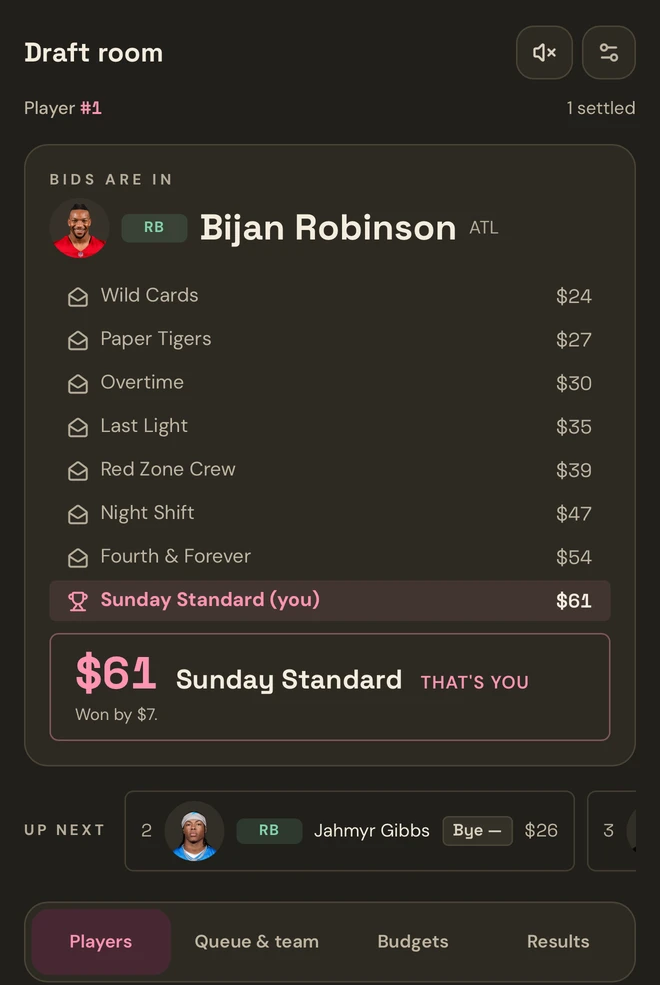
A scheduled draft has long gaps, then real urgency. Email carries the plan. The chosen instant channel carries the clock.
Pre-bidding is open
- When
- A Knife Fight Draft opens its early sealed board
- Job
- Let owners build a queue before the first player opens.
Draft day and draft start
- When
- The scheduled draft is near, then moves live
- Job
- Bring back owners who joined days or weeks earlier.
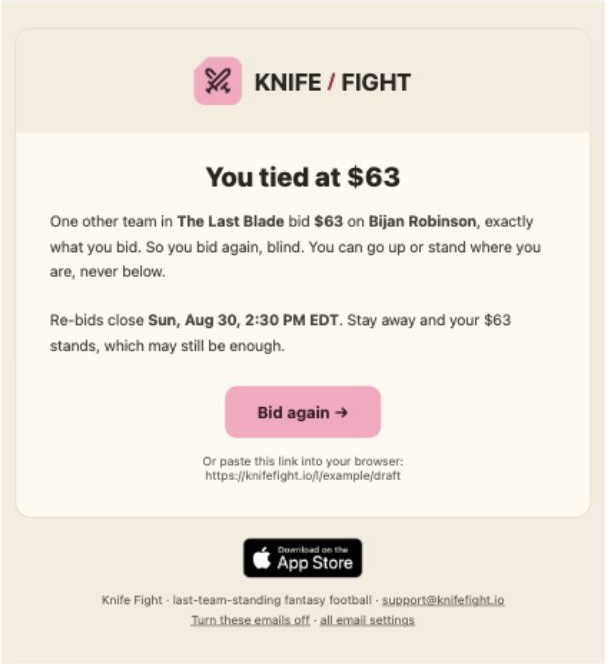
Your decision is live
- When
- A slow pick opens or a sealed tie needs a re-bid
- Job
- Turn the current draft state into one clear action.
10 minutes remain
- When
- A slow-draft clock is close to expiring
- Job
- Prevent an autopick without nagging all draft long.
The room changed or went quiet
- When
- A commissioner changes the room, or a slow draft enters quiet hours
- Job
- Keep owners aligned with the current decision, remaining clock, and resume time.
03 · Season
Make the stakes impossible to miss.
Lifecycle follows the same evidence the player sees in Cut Line and My Team. Warn while a lineup is repairable, qualify a projected risk, and close the loop only after the result is final.
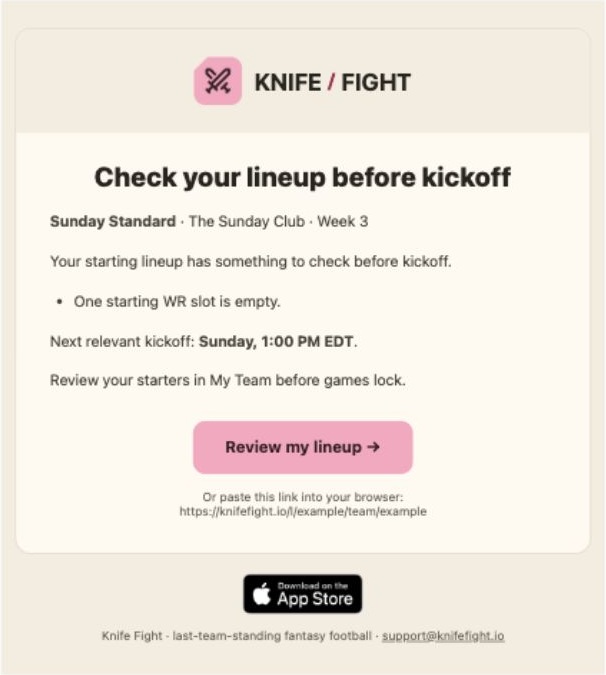
Check before kickoff
- When
- A repairable lineup issue reaches the hour before its relevant kickoff
- Job
- Point to an empty slot, unavailable starter, or evidenced zero projection. In Best Ball, check roster coverage rather than ask for a manual lineup.
You're on the line
- When
- A live score moves a team into the cut zone in a real league
- Job
- Surface the one change that can end a season.
You've been cut
- When
- Final scoring confirms the elimination
- Job
- Tell the eliminated owner the result. Game-mode round cuts also alert league members by SMS or push.
Scramble result
- When
- A waiver run completes
- Job
- Send winners to their roster and owners with no wins to Armory. Transactions keeps private explanations; Gallery holds the public report.
Weekly cut recap
- When
- The cut and waiver cycle is complete
- Job
- Package the week into a durable league story.
The Last Blade
- When
- The final survivor is crowned
- Job
- Keep and share the final result. Game-mode finals also alert league members by SMS or push.
A projected outlook is separate from confirmed safety. Cut-risk alerts require current live evidence; stale data suppresses misleading projections. Simulations never send paid SMS.
04 · Trade
Tell the right person what happens next.
A trade moves between two owners, a commissioner, and a review clock. Each person gets the next action, not a history lesson.
New offer or counter
- When
- An owner sends or revises a deal
- Job
- Put the live decision in front of the other owner.
Rejected, withdrawn, or closed
- When
- An offer is declined or withdrawn, or review ends in a veto, void, or expiry
- Job
- Notify the affected owners and retire queued messages for the previous offer state.
Trade to review
- When
- An accepted deal enters the review window
- Job
- Give commissioners the deadline and a direct route to review.
Trade completed
- When
- The review window closes and the deal executes
- Job
- Confirm the result and send both owners to their updated teams.
The copy changes with the recipient. The route changes with the action they own.
Delivery is part of the journey
A queued message is still a product decision.
A provider outage can separate the event from the send. I built the retry path around the state now, so yesterday's truth cannot reopen an action that is already over.
Recheck the recipient
Current membership, email ownership, category preferences, verified SMS consent, and suppression are checked before delivery. Failed destinations retry; successful ones do not.
Recheck the action
A countered trade, rewound draft pick, changed draft order, or restored cut invalidates the message that described the old state.
Warn while repair is possible
Pregame checks require fresh schedule and player evidence. Resolved issues cancel unsent alerts. Zero projections are a heads-up, not a confirmed inactive designation.
Keep the promise specific
One eligible instant channel per covered event. Draft quiet hours explain the resume time. Private waiver outcomes stay private. Standard recaps and Gallery chat do not gain a push just because they can.
The operating rule
Useful beats frequent.
Each message starts with a product event and earns delivery again at send time. Email carries context. Eligible SMS or push earns the interruption. Universal Links hand the player back to the action, and the product remains the source of truth.
Back to the Knife Fight case study →